
Your files. Hosted in Sweden. Under your control.
LevelSync gives your organisation secure access to business files across your devices — without a VPN, and without wondering where your data lives. The service is hosted and operated by POISE AB on infrastructure in Stockholm.
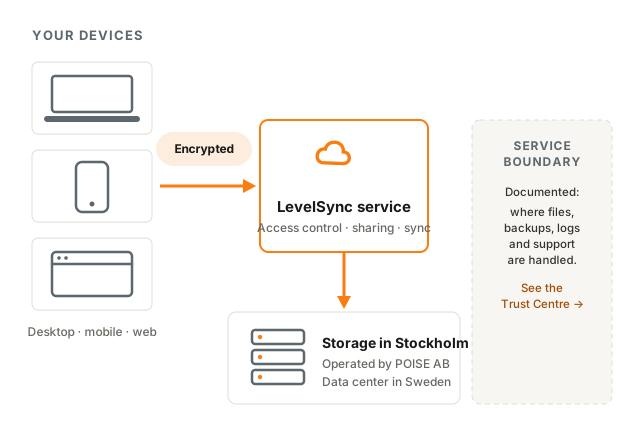
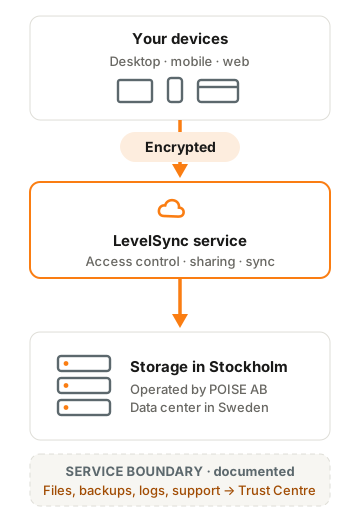
- Hosted in Stockholm
- Operated by POISE AB
- Encrypted in transit and at rest
- Granular access controls
- File history and recovery
Modern file access without giving up data location
File servers tie remote work to VPNs; global clouds blur where your data lives. LevelSync is the practical middle path: familiar, managed storage with modern access — and a clear answer to "where are our files?"
 Swedish hosting
Keep business files close
Your files are stored on infrastructure operated by POISE AB in Stockholm, Sweden. We document the service boundary — where files, backups, logs and support processes are handled — so your answer to auditors, customers and your own management is short and verifiable.
| Legal operator | POISE AB, Sweden |
|---|---|
| Service location | Stockholm, Sweden |
| Platform technology | RushFiles |
| Support | POISE, Swedish business hours |
 Access control
Decide who can reach what
Manage users and groups, apply sharing policies, protect accounts with two-factor authentication, and review activity in audit logs. Share files externally through controlled links with passwords and expiry dates — instead of e-mail attachments you can never take back.
- Users & groups — permissions that mirror how your organisation works
- Two-factor authentication — with password policies and lockout rules
- Controlled share links — passwords, expiry, download logging
- Audit trail — who did what, when, from where
 Everyday work
Work with files on every device
LevelSync runs where your team works: Windows, macOS, iOS, Android and the browser. The desktop client behaves like a familiar mapped drive, files can be kept available offline, and supported Microsoft 365 documents can be edited together in real time.
| Desktop | Windows & macOS — mapped drive, offline files |
|---|---|
| Mobile | iOS & Android apps |
| Web | Full access from any browser |
| Office | Microsoft 365 co-editing |
A managed route from storage to every authorised device
Set up
POISE provisions your LevelSync environment and agrees the onboarding plan with your organisation.
Control
Your administrators configure users, groups, permissions and sharing policies.
Access
Your team works with files from desktop, mobile and web — no VPN required.
Recover
Administrators review activity and restore earlier file versions when needed — including after a ransomware incident.
 Recovery
Ransomware happens. Recovery should be routine.
Stored files keep version history according to the configured retention policy. After a ransomware incident or an accidental overwrite, administrators restore affected files to an earlier available version — no negotiating with attackers.
 Accountability
A Swedish company answers for the service
LevelSync is a service from POISE AB, a Swedish security company operating since 2001. POISE runs the infrastructure and support; platform technology is provided by RushFiles. The full service boundary is published in the Trust Centre.
Straight answers
How is this different from OneDrive or Dropbox?
Those are major global cloud platforms — but your data location, the operator and the support chain are largely outside your control. With LevelSync, files are stored in Stockholm on infrastructure operated by a named Swedish company you can call. For organisations with data-location requirements, that difference is the whole point.
Can LevelSync replace our file server?
Yes — that is its most common role. The desktop client presents a familiar mapped-drive experience and remote access works without VPN. During onboarding, POISE helps migrate your existing folder structure; with Active Directory integration, existing permissions can be mapped rather than recreated by hand. The exact migration approach is agreed before you commit.
Do we still need backup?
LevelSync keeps version history for files it stores, which covers everyday mistakes and ransomware rollback. Whether you need separate backup for other systems depends on your environment — ask us, we will give you an honest answer.
Who can access our data?
Day to day, only the users and groups your administrators authorise. On the operations side: a small number of POISE operations staff can obtain privileged access to the infrastructure for maintenance and support, and that access is logged. Whether and how RushFiles personnel can access the platform is part of the service boundary we document in the Trust Centre — we publish the answer rather than asking you to take our word for it.
Let's discuss your files, users and requirements
Try LevelSync in your own organisation, or talk to POISE about onboarding, data location and the controls you need.